
A crew of AI bots,
the AI you already pay for,
one space for your whole business.
From $40 a month, and less every month you stay.
One space for your whole business.
The crew, what it knows, the computers it works in, its tools, its chats and the Architect that sets it up, under one roof. Pick a room.

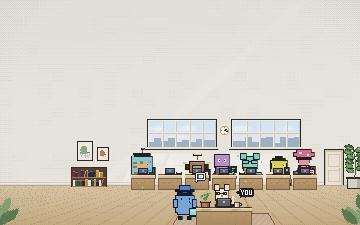
An example space. Every bot named here is fictional.
A bot for each job.
Each bot has one responsibility, a computer of its own and only the tools you grant it.
- Morning inbox · Weekdays 8:00 AM
Morning inbox: nine new tickets, seven answered from the help docs. Two need you.
IntercomNotionGmail - Pipeline review · Fridays 4:00 PMHubSpotGmailGoogle Calendar
- Weekly newsletter · Thursdays 9:00 AMMailchimpX
- Preview checks · Every day 11:00 PMGitHub
- Policy review · Quarterly first MondayGoogle DocsGitHub
- Applicant digest · Weekdays 5:00 PMGreenhouseGmailGoogle Calendar
- Investor update · Monthly 1st at 9:00 AMStripeMercuryGoogle Sheets










- Message it, or put its work on a schedule
- Its own memory and notes
- Hand it a new job any time
Teach it once. Every bot works from it.
Your deck, docs, pricing and policies become one Library. You choose which bots read each source.
Kai reads 5 of 8 sources: Your help center, Pricing & terms.pdf, Security policies.md, Customers.csv and Brand voice.md.
206 facts from 8 sources. Pick a bot to see what it reads, or a source to see who reads it.
- Cited: answers point to the passage
- Granted per bot
- Yours to correct or forget
- Cited
- Every answer points to the passage it came from.
- Granted per bot
- A source is shared with every bot, or only with the ones you name.
- Yours to correct
- What a bot learns on its own waits for your review. Forget a source, and its facts go with it.
A computer of its own.
Every bot works in an isolated computer: a browser, files and a terminal, apart from yours.
- site
- launch
- support
- pricing-and-terms.pdf
- Research, forms and websites
- Builds and previews
- Nothing shares your desktop
Your tools, granted per bot.
Each bot gets only the tools you grant it. Credentials stay in the encrypted secret store.
Kai can use Intercom, Notion and Gmail. Nothing else.
- Intercom
- Notion
- Gmail
- HubSpot
- Google Calendar
- Mailchimp
- X
- GitHub
- Google Docs
- Greenhouse
- Stripe
- Mercury
- Google Sheets
- About 1,500 apps in the catalogue
- MCP servers and OpenAPI
- Take a tool back any time
Where work comes in, and decisions reach you.
Bots answer in the chat apps your deployment has set up: Slack, WhatsApp, Telegram, Lark, and iMessage or SMS.
- Slack
- Telegram
- iMessage
- Lark



- Group chats in Slack, and in iMessage or SMS
- A phone agent with a call flow, a voice and test calls, where calling is enabled
- Decisions reach you where you are
It proposes. You apply.
The Architect sets up the crew around your business, then keeps proposing: a bot, a routine, a source to share.
- New botAdd Theo for hiringWaiting for you
Writes the job post and screens applicants against your scorecard.
- RoutineMorning inbox for KaiWaiting for you
Weekdays at 8:00 AM: answer new tickets from the help docs.
- LibraryShare Pricing & terms with KaiWaiting for you
So refund answers quote the terms.
- A crew around your business Tell it what you do and what lands on you. It drafts the crew and the first routines.
- Proposals, not surprises A new bot, a routine or a shared source waits for your Apply.
- Small edits apply at once A profile change you ask for is applied as you ask.
Use the AI you already pay for.
Sign in with a subscription, paste a key, or point One at your own model. Switch any time; the crew keeps its memory, its files and its routines.
Sign in with your subscription
The app's own sign-in. Usage is not billed through One.
Paste an API key
Model usage is billed by the provider. Your plan's credits are separate.
Run your own model
On your machine or your server, through its OpenAI-compatible endpoint. No model bill.
Voice
- Cartesia
- ElevenLabs
- Fish Audio
- OpenAI


Images and video
- OpenAI
- Google Gemini
- xAI
- Black Forest Labs
- fal
- OpenRouter





Works with your tools.
Connect the apps you already use. Each bot gets only the tools you grant it, and credentials stay in the encrypted secret store.
Pick a bot: only its tools stay lit.








- GmailOne-click connect
- Google CalendarOne-click connect
- Google DriveOne-click connect
- NotionOne-click connect
- SlackOne-click connect
- StripeOne-click connect
- ShopifyNeeds a one-time setup
- HubSpotOne-click connect
- QuickBooksOne-click connect
- XeroNeeds a one-time setup
- LinearOne-click connect
- GitHubOne-click connect
- CalendlyOne-click connect
- IntercomOne-click connect
- ZendeskOne-click connect
- AirtableOne-click connect
- Anything with an APIMCP servers and OpenAPI










About 1,500 apps in the catalogue; some need a one-time setup.All connectors
Product names and logos are trademarks of their respective owners. Their use does not imply endorsement.
Builds the ones you're missing.
Pip builds landing pages, internal tools and prototypes in its own computer, then hands you a working preview.
YouBuild a waitlist page for the new service.
PipOn it. Building in my computer; I'll hand you the preview.
Preview readyyour-business-preview.one.app/waitlist
You review the preview. Managed publishing is still in development.
An account, a conversation, and the first job handed off.
Create your account and connect your AI
Sign in with ChatGPT Plus/Pro, GitHub Copilot or SuperGrok, or paste an API key.
Tell the Architect about your business
Share your site, deck or docs, or talk it through. It drafts a Blueprint and chooses your crew.
Hand the crew its first jobs
Message a bot or set a routine. Decide what needs your approval; the rest runs.
$40 to start.
Less every month you stay.
- Bring your own AI subscription or API keys
- 4,000 credits included monthly
- One space for your business
- Limited workspace resources
- Community support
- $22.75 a month from month 12, for as long as you stay
- Or $240 billed annually
Cancelling resets the schedule. Model usage is billed by your provider.
Adding people, or a second business?One for Teams
What founders ask us.
What needs my approval?
By default, bots act without asking. Two things ask until you always-allow them: placing a phone call and publishing a phone agent. You can add rules: ask before sending external email, before purchases, or before a particular tool, connector or category, and flag unexpected actions. You decide what needs your approval.
Which AI subscriptions and keys work?
Sign in with ChatGPT Plus/Pro, GitHub Copilot, or SuperGrok or X Premium. Or paste an API key from OpenAI, Anthropic, Google, xAI, DeepSeek, Mistral, Groq, Cerebras, Fireworks, Together, OpenRouter, Vercel AI Gateway, Hugging Face, NVIDIA, MiniMax, Moonshot AI, Z.AI, Kimi For Coding, Qwen Token Plan or Xiaomi. Or run your own model with Ollama, LM Studio or any OpenAI-compatible server. Each provider's terms apply to its own subscription or key. Models
What will I pay, model usage included?
Creator is $40 in month 1, 5% less each month until month 12, then $22.75 a month for as long as you stay, or $240 billed annually. Model usage is billed by your provider, or runs on the subscription you sign in with. The plan's 4,000 included credits are separate from that. Pricing
What is in my space, and what if I need a second one?
Creator gives you one space: your crew, the Library, each bot's computer, your tools and chats, and the Architect. When you add people, or want a second business in a space of its own, One for Teams adds seats, more spaces and admin control. One for Teams
Where does my data go?
Your files and context stay in your workspace. A request to an outside model, speech or connector provider goes to that provider, and its terms apply. Trust & deployment
Can it build my product?
A builder bot makes landing pages, internal tools and prototypes in its own computer and hands you a working preview. Your product's code and releases stay yours; managed publishing is still in development.
Do I need to be technical?
No. You sign in with a subscription or paste a key, tell the Architect about your business in plain words, and message your bots the way you would message a person. Keys and server URLs are there if you want them.