Seats for your people, a space for every team, a crew of AI bots in each.
Business from $100 a month.
Your company in One.
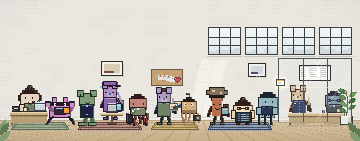
A seat for each person, a space for each team, a crew in every space. Choose a person or a space to see who works where, and what they can do there.
- Help center
- Service terms.pdf
- Customer list.csv
- NadiaSupport lead
- FelixSupport
- YouOwner
Bots act without asking otherwise.
- Vera Phone line1,500
- Bea Customer support900
Your model providers bill their usage separately.
People and roles
Invite people by work email. Owners and admins run the workspace; members work in the spaces they’re given.
Access per space
Choose who can enter each space, and whether they work with the crew, change it, or approve what it asks.
Rules per space
Bots act without asking by default. You decide what needs approval in each space, and who approves.
An example company. Every person and bot named here is fictional.
Work arrives where it already arrives.
Each arrival lands in the right space, the crew does its part, and the decision reaches the person who owns it.
- Slack
- Telegram



- Telnyx
- Plivo
- Vonage
- Exotel
- Vobiz





Wherever your deployment has them set up. Group chats work in Slack and in iMessage or SMS.
- ArrivesSupport line+1 (555) 010-4410 · Phone carrier
- Space and botSupport VeraPhone line
- Your biggest customer calls: six of their accounts stopped syncing.
- Vera fixes the sync on the call, and hears they want 40 more seats.
- OutcomeWritten to Callbacks
- Caller
- Your biggest customer
- Solved on the call
- Sync: sign out and in again
- Reason
- Add 40 seats to the contract
- Callback
- Thursday 10:00
- ReachesNadia Support leadNadia takes Thursday’s call.
- Arrives#salesSlack
- Space and botSales CassSales
- Rosa asks in #sales: can the new prospect have the proposal before Friday?
- Cass drafts it from the rate card and the demo notes, and answers in the thread.
- OutcomeCass, in the thread
Draft ready: proposal.pdf. 64 seats, two offices, onboarding in March. It’s waiting for you to send.
- ReachesRosa SalesSending it is an external email, so it waits for Rosa.
- ArrivesA client’s project leadWhatsApp
- Space and botClient go-live WynnOnboarding
- A client’s project lead writes: can the second office go live a week early?
- Wynn checks the go-live plan and the open tickets.
- OutcomeWynn, on WhatsApp
The second office can go live on the 14th if the user list arrives by Monday. Yusuf will confirm the date today.
- ReachesYusuf Client leadYusuf confirms the new date.
- ArrivesContact formYour website · starts a routine
- Space and botSales CassSales
- A visitor asks for a quote for 30 seats on your website’s contact form.
- The form starts Cass’s routine: Cass reads the request, looks the company up and drafts the reply.
- OutcomeWaiting for approval
Send the quote to the visitor, and add them to the CRM.
A run a form starts reads and drafts on its own, and always asks before anything with an effect outside One.
- ReachesRosa SalesRosa approves, and Cass sends the quote.
The AI contracts you already have.
Connect your company’s keys once. Each space uses the connections you allow, every provider bills its own usage to you, and model usage is not billed through One.
Personal AI subscriptions, such as ChatGPT Plus or GitHub Copilot, sign in on One for Individuals. One for Individuals
Direct providers
- OpenAI
- Anthropic
- xAI
- Mistral
- DeepSeek
- Groq
- Cerebras
- Fireworks
- Together
- NVIDIA
- Hugging Face
- MiniMax
- Moonshot AI
- Z.AI
- Qwen Token Plan












Gateways
- OpenRouter
- Vercel AI Gateway


Your own servers
- Ollama
- LM Studio
- Any OpenAI-compatible endpoint, such as vLLM or llama.cpp

Voice
- Cartesia
- ElevenLabs
- Fish Audio
- OpenAI


Images and video
- Black Forest Labs
- fal
- OpenAI
- xAI
- OpenRouter


Product names and logos are trademarks of their respective owners. Their use does not imply endorsement.
Which connection each space uses
Bots use a tier instead of a model name. Point a tier at another connection and every bot on it follows, with nothing rebuilt.
| Fast | Default | Smart | |
|---|---|---|---|
| SupportA team | |||
| SalesA team | |||
| FinanceA function | |||
| Client go-liveA client |
Support’s Default tier now uses OpenAI. Its bots follow the change, and OpenAI bills the usage to your account.
Semi-private, or a server of your own.
Your people and their crews work the same way wherever One runs. Two ways keep your work on hardware of its own; One’s cloud with your own keys is the baseline beside them.
The shared server
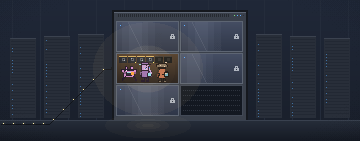
Six sealed sections on one GPU server. Yours is lit: your crew works in it, on the open models hosted for you.
- A GPU server shared with a few teams, your data in a section of its own
- Open models hosted for you
- Unlimited voice agent: 2 at a time on Pro, 5–10 on Max; more lines at once on credits
- Unlimited tokens* on the hosted models, capped by the GPU capacity you choose
- Your keys still work
- Your company
- Another team
- Free
The capacity you choose sets how fast your tokens arrive.
| Semi-privateBusiness Pro, at Pro or MaxFrom $400 a month | PrivateEnterpriseFrom $4,000 a month | On One’s cloudBusinessWith your own keys | |
|---|---|---|---|
| Where it runs | A GPU server shared with a few other teams | A GPU server for your company alone, run by us | One’s servers |
| Your data | On the shared server, in a section that is your team’s alone | On your server, under the policy you agree with us | In your workspace on One’s cloud |
| Your models | Open models hosted for you on the server’s GPUs, agreed with you. Your keys still work. | The open text, voice and image models you choose | The AI contracts you already have |
| Voice agent | Unlimited usage, 2 calls at a time on Pro and 5–10 on Max; more at once on credits | Your private speech models | On your credits |
| Tokens | Unlimited* on the models hosted for you | Your server’s capacity | Billed by each provider |
| Support | Priority support | Setup, upkeep and model updates by us | Priority support on Business |
| Custom work | Custom solutions built for you, when appropriate and agreed together | Custom work, scoped with you | Custom solutions come with Business Max |
| Price | From $400 a month | From $4,000 a month | From $100 a month |
| Talk about Business Pro | See One for Enterprise | See the plans |
*Unlimited tokens on the models the server hosts for you. How fast they arrive depends on the GPU capacity you choose. Carrier and phone-number charges are separate.
Outside services you connect still receive what their jobs need: the phone carrier, connected apps, and any hosted model or speech provider. How data moves
How it starts.
From a first conversation to your people handing off work.
Tell us which team starts first
Support, sales, finance: the one with the longest backlog of screen work. We agree the plan and where it runs.
We set up your spaces, seats and keys
A space for each team, a seat for each person, your company’s model keys and your rules. Or your semi-private section.
Your people sign in and hand off work
They work with the crews where work already arrives. You see who did what, and what waits for you.
The plans
- BusinessFrom $100 a month3 spaces, your team in each, on your own keys; 5% less each month until month 12.
- Business Pro$400 a monthSemi-private hardware, unlimited voice agent 2 at a time.
- Business Max$1,000 a monthEverything in Pro, with 5–10 voice agents at a time and custom solution access.
- EnterpriseFrom $4,000 a monthYour own private server, run by us.
All are arranged with our team.Compare plans
What teams ask us.
Can my whole team use one account?
Your company has one One for Teams workspace, with a seat for each person, invited by work email. Everyone signs in as themselves, and owners and admins decide which spaces each person can enter.
Who can see what?
A space’s people see that space: its crew, its Library, its conversations and its connected tools. A bot works only inside the space it belongs to. Admins choose who can enter each space and what they can do there.
What needs approval?
You decide, per space. Bots act without asking by default. Placing a phone call and publishing a phone agent ask until you always allow them. You can add rules: ask before sending external email, before purchases, or before a particular tool or connector, and flag unexpected actions. You also choose who approves.
Which AI providers can we use?
The ones your company already has contracts with: OpenAI, Anthropic, Google, xAI, Mistral, DeepSeek, Groq, Cerebras, Fireworks, Together, NVIDIA, Hugging Face, MiniMax, Moonshot AI, Z.AI and Qwen, the OpenRouter and Vercel AI gateways, and your own servers through Ollama, LM Studio or any OpenAI-compatible endpoint. Each provider bills its own usage. On a semi-private or private deployment, open models run on the GPUs. Models
What is semi-private, and what stays in our section?
A GPU server shared with a few other teams. Your data is kept on that server in a section that is your team’s alone, and its GPUs run the open models you choose for the jobs you choose, at the capacity you choose. Outside services you connect, such as a phone carrier, a connected app or a hosted provider, still receive what their jobs need. The isolation and operating arrangement are agreed during setup. Trust & deployment
Which chat apps and phone lines work?
Slack, WhatsApp, Telegram, Lark, and iMessage or SMS through Sendblue, wherever your deployment has them set up. Group chats work in Slack and in iMessage or SMS, and a bot joins a group only after the person who linked it replies YES. Phone lines run through supported carriers: Telnyx, Plivo, Vonage, Exotel and Vobiz. Numbers and carrier charges are confirmed when calling is set up.
Can two bots work on one job?
Yes. Put two to six bots in a group. Each does its part in the same thread and hands the next stage on, so every step is in one place.
What does it cost?
Business is $100 in month 1 and 5% less each month until month 12, on One’s cloud with your own keys. Business Pro, on semi-private hardware, is $400 a month, or $1,000 as Business Max, and a private server on Enterprise starts at $4,000 a month. Your model providers bill their usage separately, and carrier and phone-number charges are confirmed when calling is set up. Pricing
Can you build something custom for us?
Yes. Business Max and Enterprise customers can ask for custom solutions. We agree the scope, and whether it’s realistic, before we start. Ask for a custom solution